Media type
Reels (narrated shorts)
A reel is a finished vertical short: script, narration, visuals, captions and music, made in one job.
Reels need an AI text service: the local AI text model that automatic setup downloads, or a free Gemini API key in Settings. It writes the script and checks the narration before anything is generated. Without one, the reel is refused with a message saying so.
1. Content & Script
On Create choose Reel (9:16 by default). Pick where the script comes from:
- Niche: choose one of 14 niches (Scary Stories, Mythology, History, Biblical, Anime, Heists, School Gossip, Acts of Kindness, Motivation, Money & Finance, Fun Facts & Trivia, Power & Survival, Quiet Confidence, Fable Wisdom) and an optional Topic.
- From URL: paste an Article or YouTube URL. The script adapts the source rather than copying it. YouTube videos need captions.
Set the number of Scenes, then click Generate script. Script writing needs a Gemini key or the free local AI model.
2. Voice & Captions
- Voice: pick a narration voice (see Voices). Untick it for a silent reel and set Scene duration.
- Narration speed (ElevenLabs voices).
- Narration language: English or one of 28 others. Use Translate narration after generating the script. ElevenLabs voices sound best for non-English narration.
- Captions are burned in. Pick a caption style in Advanced; 🎤 styles highlight each word as it's spoken.
3. Visual Style
| Style | What it does | Needs |
|---|---|---|
| Normal | An AI image per scene with a slow pan and zoom. | Nothing extra |
| Talking object | Animates each scene's image. | Video models (12 GB card). Much slower. |
| Gameplay background | Your own uploaded video plays under the narration. | A video you own or are licensed to use |
| B-roll | Matches clips from your Stock Footage library to each scene by keyword. | Stock Footage library items |
| Whiteboard | A hand-drawn reveal of each scene. | Optional SVGs from Whiteboard Assets |
| Talking avatar | Lip-syncs a character photo to the narration. | Not available in version 1.0.3 |
4. Extras
- Auto thumbnail + hook title: one extra image with a catchy title.
- Sound effects at scene cuts: a specific effect or random from your library.
- Background music and brand kit in Advanced. Music is automatically lowered while someone speaks.
5. Edit and create
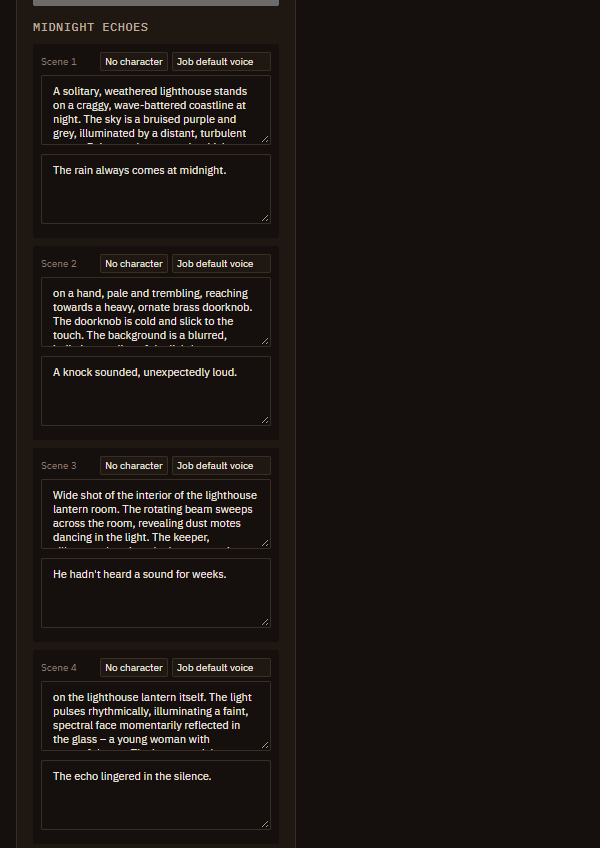
Each scene has a Visual prompt and Narration you can edit, plus a per-scene character and voice. Different voices per scene make a conversation. Then click Create reel.
Narration passes an automatic content-safety check before the job starts.
Home · User Guide · Support · Privacy Policy · Terms of Service