Your results
Gallery
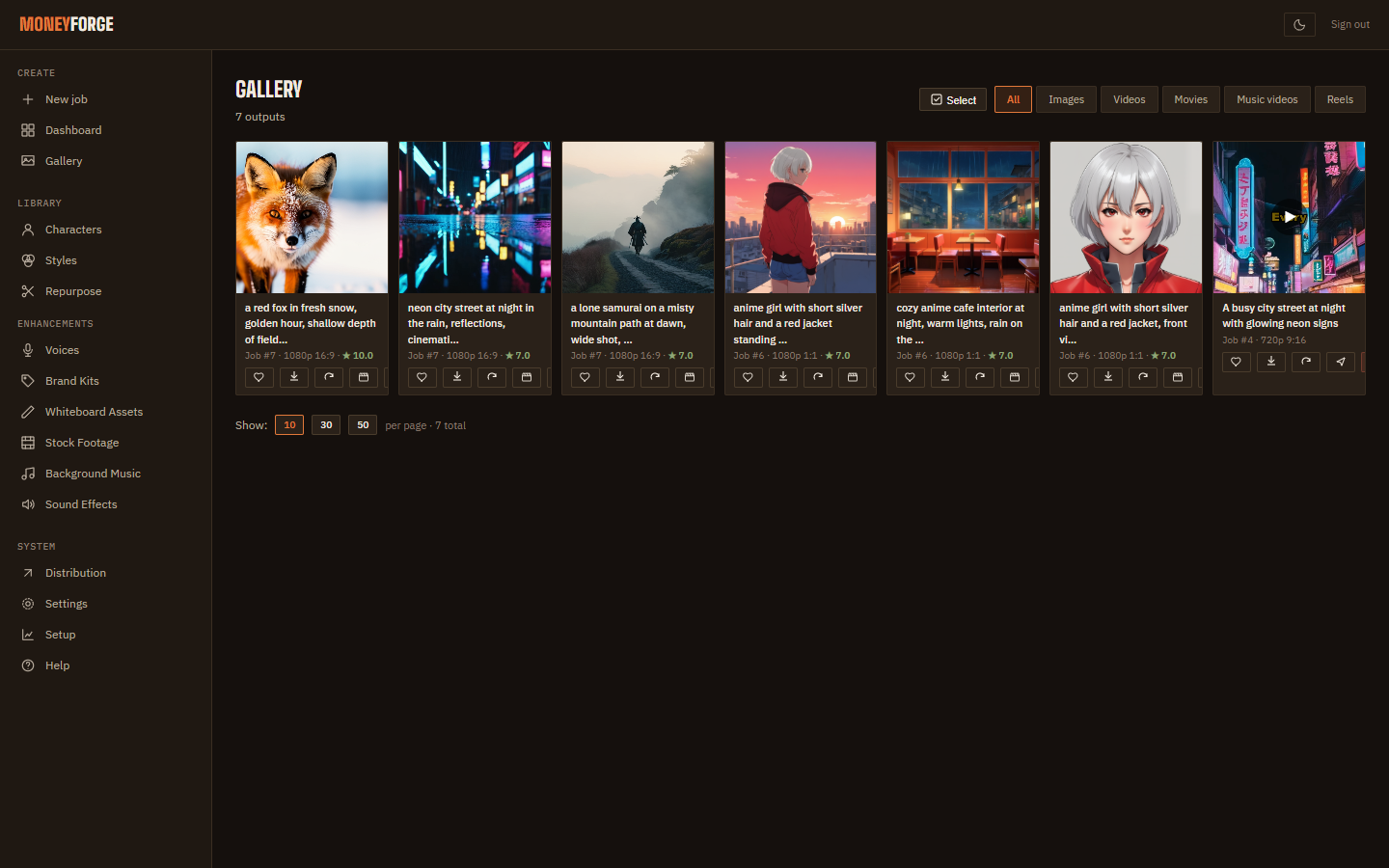
Everything you make lands in the Gallery. From here you can download, remix, animate, fix one scene, resize for another platform or post.
Browse and download
Filter by All, Images, Videos, Movies, Music videos or Reels. Each card has favourite, download, Remix, Animate, Distribute and Delete. Use select mode for Download selected or Delete selected. Deleted items go to the Trash in Settings and can be restored.
Remix and Animate
Remix reopens Create with the same settings. Animate turns an image into a video starting from that image.
Fix one scene
For movies, music videos and reels, open the item and click Scenes. Edit one scene's prompt (and narration for reels), then Regenerate this scene. Only that scene is remade; music, captions and branding are reapplied to the finished video.
Platform versions
Repurpose → Create platform variant makes a copy cropped for another platform, keeping faces in frame. Videos that are too long are trimmed to the platform limit: YouTube Shorts 60 s, Instagram and Facebook 90 s, X 140 s, TikTok 600 s.
Post from the Gallery
Distribute opens the posting form: platforms, title, description (an AI caption is suggested), privacy, then Post. See Posting & scheduling.
Home · User Guide · Support · Privacy Policy · Terms of Service