Your assets
Libraries and brand kits
Libraries hold your own media, reused across jobs. A checkbox on Create stays greyed out until its library has at least one item.
Upload only media you own or are licensed to use.
| Library | Fields | Used by |
|---|---|---|
| Background Music | Name, Audio file, Mood, Tags | Music under reels, videos and movies. Auto-match by keyword picks by tags and mood. |
| Sound Effects | Name, Audio file, Tags | Effects at reel scene cuts and repurposed-clip starts. |
| Stock Footage | Name, Video file, Tags | B-roll reels: scenes are matched to clips by tags. |
| Whiteboard Assets | Name, SVG file, Tags | Per-scene drawings in whiteboard reels. |
Good tags make matching work: describe what's in the clip or the mood of the track ("city, night, traffic", "calm, piano").
Brand kits
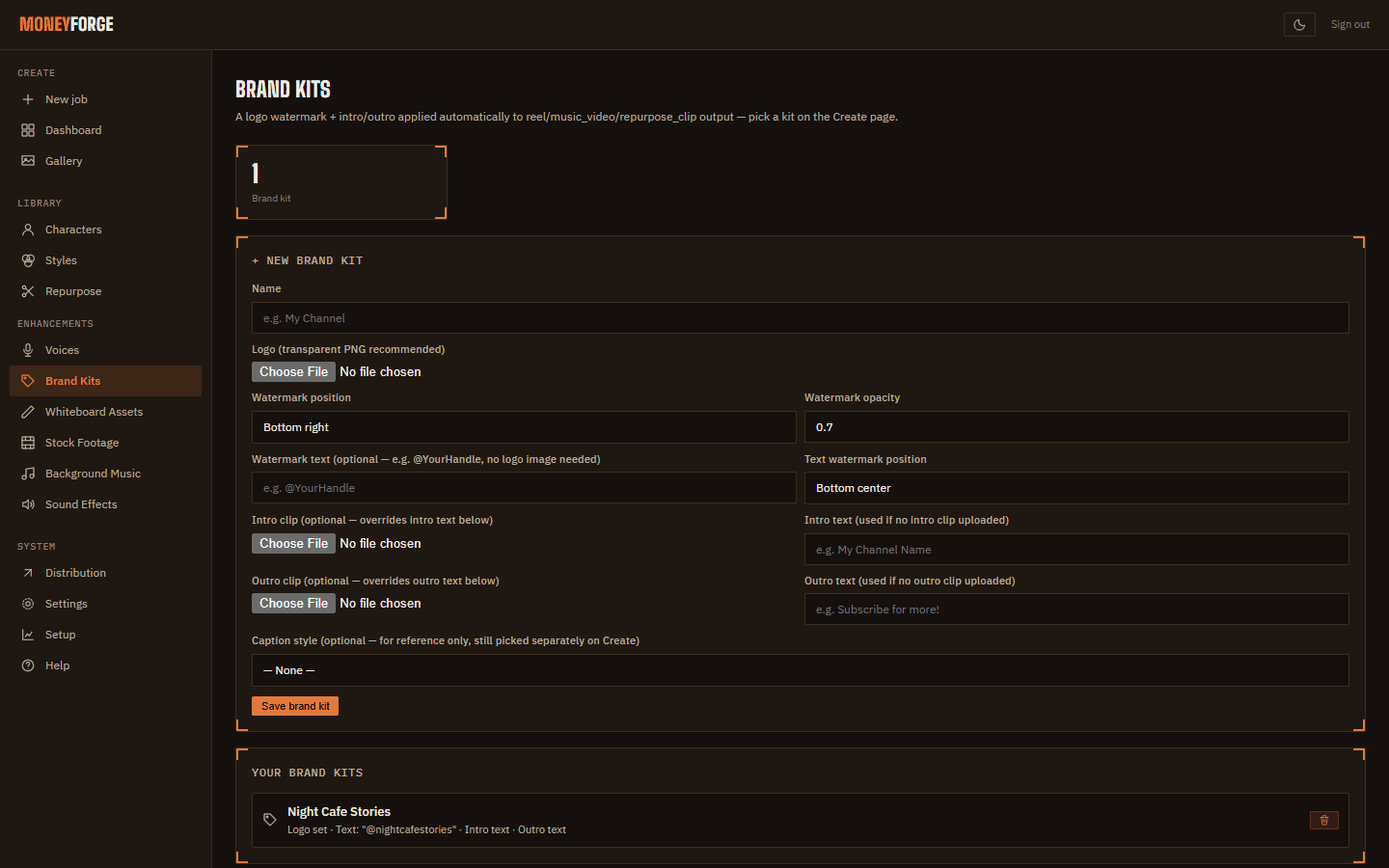
A brand kit puts your branding on every reel, music video and repurposed clip. Open Brand Kits and set:
- Logo with Watermark position and Watermark opacity.
- Watermark text and its position (for example your @handle).
- Intro clip or Intro text, and Outro clip or Outro text.
Choose the kit under Brand kit in Create's Advanced section.
Home · User Guide · Support · Privacy Policy · Terms of Service